Methodology · how the work is done

How IconFlow
makes icons.

Not a prompt and a picture. A product brief, competing ideas, one editable SVG on a 1024 grid, exact renders at the sizes people really see, a mechanical check, a scored review by the designer, and a receipt that binds approval to the exact source. Each step in plain English, with the real artifacts beside the claims.

  • Every artifact shown is in the repository
  • 16px proofs are shown at 16px
  • No vendor endorsement implied
Specimen · Petal Haypilecurrent mark
IconFlow mark from its editable SVG: a low-eared pika returning to its hay store with three petals
master.svg · rendered by the browser
Exact 128 by 128 pixel render of the IconFlow mark Exact 16 by 16 pixel render of the IconFlow mark, shown at actual size The same 16 pixel render magnified five times, pixels kept sharp
exact 128px · exact 16px · 16px zoomed
check0 warnings
review6 axes ≥ 4/5
ship23 files

The real pipeline

Nine stages.
Two of them are judgment.

Every stage leaves a file behind: a brief, concept thumbnails, an SVG, a warnings list, PNGs, a scored receipt, a build, a case record. Click a stage to read how it works.

  1. BriefUser job, essence, clichés, targets
  2. Diverge4+ concepts, cliché filter, one device
  3. SVGEditable geometry on the 1024 grid
  4. CheckSafety, grid, stroke, contrast, crop
  5. RenderExact Chromium pixels at 16 and 128
  6. ReviewSix axes, scored by the designer — human or agent
  7. ReceiptApproval bound to the source hash
  8. ShipFail-closed build of every target
  9. LearnCase record and distilled rules

mechanical stagedesign judgment

Stage 01 · Brief

Start with the job,
not the picture.

A noun-only prompt (“make me a chat icon”) produces decoration. IconFlow’s brief records what the person using the product is trying to get done.

The user job comes first

The playbook asks for five things before anyone draws: what the icon is (app, favicon, tray), a one-word essence, the brand color, a personality lane, and where the icon will live small. The distilled rule from the casebook is blunt: choose the user’s job, not the category noun. “Route”, “decide”, “compare” and “scout” produce better marks than “game”, “conference” or “travel”, because category nouns are where clichés live.

Then a concrete noun

Distinctiveness in this system means specificity. The strongest marks in the casebook are a specific, ownable thing — a price tag, a cut gem, a folded route map, a maneki-neko — whose blacked-out silhouette names an object rather than a category. A bare initial on a gradient tile is named in the docs as the single most common way an AI icon looks competent and forgettable at once.

For privacy-sensitive products the brief is reduced to a neutral job verb, and the public case record keeps the visual evidence without the category noun, repository names or local paths.

Stage 02 · Diverge

Four ideas,
then one device.

This is the stage most AI-made icons skip, which is why they all look the same. IconFlow makes it mandatory and gives it tests that can be failed.

Diverge through different lenses

For one brief the designer (human or agent) sketches at least four concepts through different lenses — the literal object, a metaphor, the core verb, a letterform fused into the object, an abstract system, or a negative-space dual reading. Two concepts that share a silhouette count as one.

Filter the clichés

A documented cliché table pairs each product category with its overused symbols and a direction to push toward instead. The rule is simple: if your concept is the “avoid” cell, it is not done. The house list also refuses to represent “AI” with brains, robots, sparkles, wands, neural nodes, or the default blue-to-purple gradient.

Add one signature device and test it

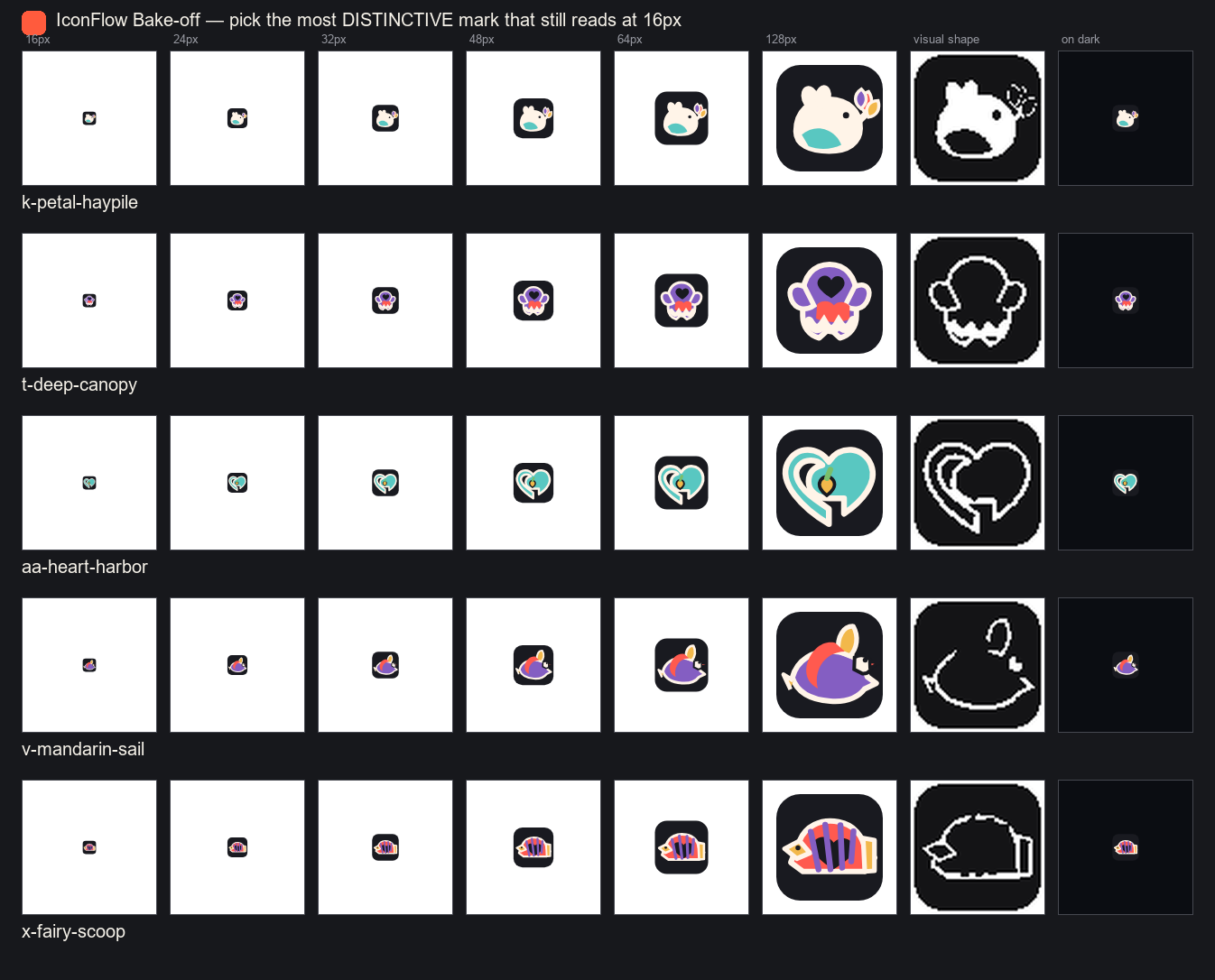
One device — a dual reading, ownable geometry, a fused letterform, an unexpected crop, an ownable color pairing, or a single accent. Then four hard tests before any polish: the name-the-thing test at 128px and at 16px (a passing answer is a concrete noun), the silhouette test with color removed, the maskable test (essential detail inside the central 40%-radius safe circle), and the row test against eight competitor favicons. Finalists are then baked off side by side with iconflow compare, and the winner is judged by shape, not by 128px color.

IconFlow concept bake-off sheet comparing three candidate marks at native sizes and as silhouettes
A real bake-off sheet. Three finalists rendered at actual sizes and as silhouettes so color cannot hide a generic shape.
Keepsake Knot icon: two unequal teal and coral bands woven around one offset opening
Keepsake Knot — the device that survived. “Two unequal bands share one offset opening.” Pass one was rejected because the crossing read as a power symbol.
Keepsake Knot exact 128 pixel renderKeepsake Knot exact 16 pixel render at actual size
Both bands still read at 16px. The 16px chip is the exact native PNG at 1:1, never an enlargement.

Stage 03 · SVG

Geometry is authored,
not generated from noise.

The source of truth is a small, editable SVG. It can be read, diffed, hashed, and rebuilt into every target at any time.

Direct authoring on the 1024 grid

Every master is drawn at viewBox="0 0 1024 1024". At 16 pixels, 64 grid units are roughly one output pixel, so the budget is explicit: every idea-carrying accent gets about two pixels (≈128 units), every required separation at least one, and strokes thinner than about 2.3% of the side are expected to vanish. Essential content stays in the central ~80% safe area; anything that must survive an adaptive crop stays inside the central safe circle. A 16px icon has room for exactly one idea, and two opaque foreground elements must never cross.

Twenty technique scaffolds, zero finished logos

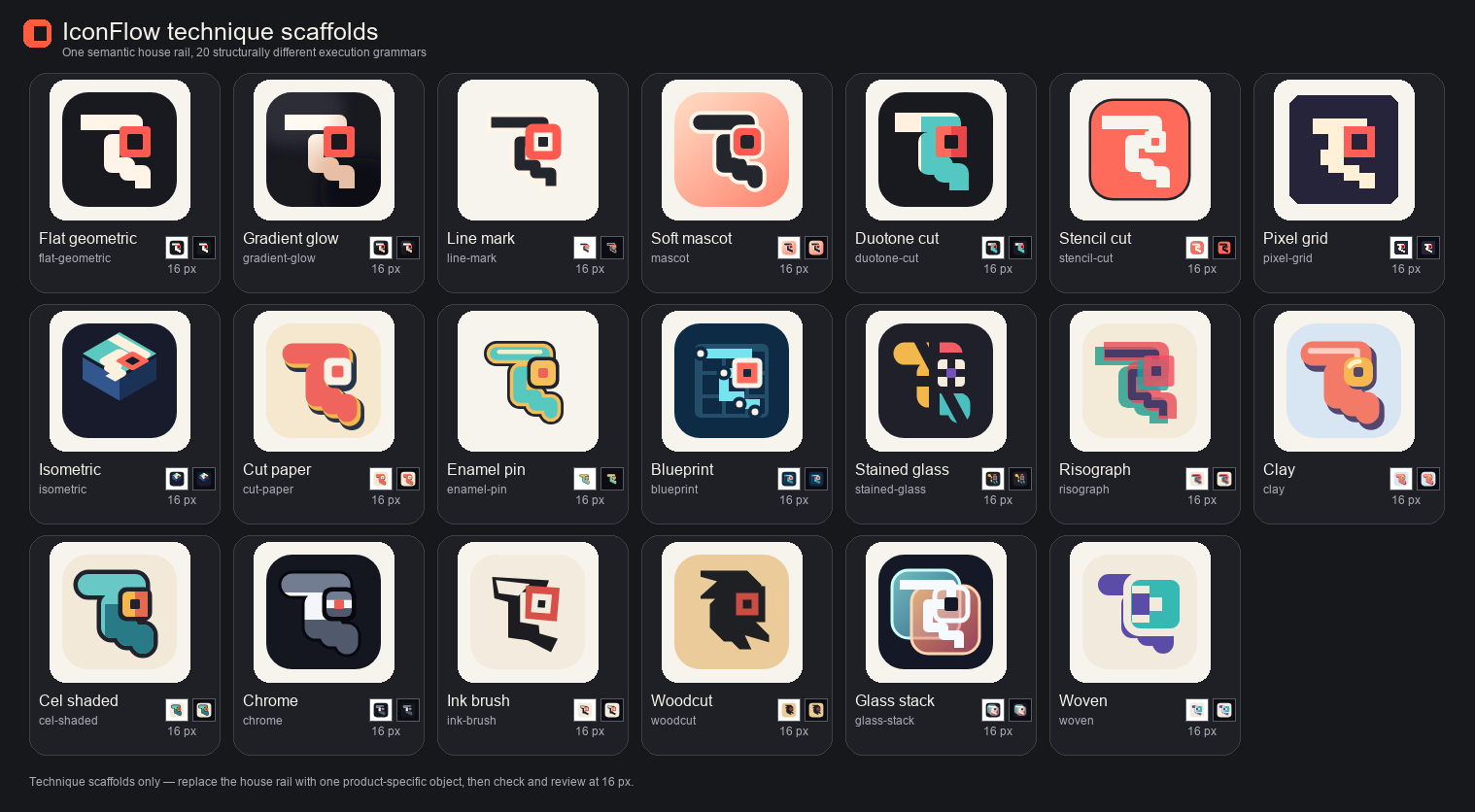
iconflow new <preset> starts from one of twenty structurally different execution grammars — flat-geometric, line-mark, duotone-cut, pixel-grid, stained-glass, woodcut and so on — each with a 16px survival rule and a monochrome tray strategy. They share the same house rail on purpose; a real icon still replaces it with a product-specific object, then runs the whole gate.

Deterministic Python where a collection needs scale

Collections do not change the method; they script the repeatable parts. The 20-study Social Signals set assigns styles with a seeded random.Random(seed).shuffle checked against the catalog before any render, and keeps each study’s path geometry inside its build script. The 400-cell Emoji Matrix is built by scripts/build_emoji_matrix.py, which re-runs check on every cell, fingerprints every proof, and fails closed if one receipt, digest or review decision is missing. Scale buys repeatability and auditability — never a pass.

All twenty IconFlow technique scaffolds on one sheet, each with its native 16 pixel proof
The twenty-technique sheet. Rendered by the same network-isolated Chromium as the build; each tile carries its own native 16px proof.

Stages 04–05 · Check and render

Exact pixels,
mechanical warnings.

IconFlow renders with a pinned Playwright Chromium, then runs a specific list of checks against what it sees.

Rendering is isolated and repeatable

The renderer treats SVG as untrusted input. Chromium runs with network and service workers blocked, page JavaScript disabled, active or animated content removed or frozen, and sRGB, locale and timezone fixed. Input is capped at 4 MiB, 50,000 elements and 128 nesting levels, and DTD or entity declarations are rejected. The 16px and 128px PNGs on this page are those exact renders, not resamples of a larger image.

What check really tests

  • SVG safety: script, iframe, object, embed, audio, video and animation elements, event handlers, external href/src, CSS url() and @import.
  • Grid: a missing viewBox, or one that is not square.
  • Stroke floor: any stroke thinner than 2.3% of the viewBox width.
  • 16px coverage: under 6% of the canvas is too small; a hard square with opaque corners will be clipped by circular crops.
  • Contrast: luminance spread on white and on dark at 16px, and on mid-gray at 32px.
  • Maskable audit: more than 8% of detected detail outside the 40%-radius safe circle on the 512px maskable asset.
  • Distinctiveness hint: live <text> glyphs — usually a typed monogram, and rendered through the build machine’s fonts.

With --tray-svg tray.svg, check and review add an advisory tray-template audit: it reports a macOS template that kept none of the color mark’s features. It is deliberately not part of the default check and never gates ship, because it audits a linked variant rather than the master.

Silhouette and similarity are separate proofs

Every reviewed case also gets a 128px visual silhouette, because distinctiveness is judged with color removed. For the 400-cell matrix a similarity report adds exact PNG hashes plus 64-bit alpha and luminance difference hashes; pairs whose combined alpha-plus-luminance Hamming distance is within 12 (same meaning) or 6 (different meaning) are flagged high risk, and exact duplicates block integration. The script calls the distance “a triage signal for visual inspection, not an admission score”.

Catnap Focus exact 128 pixel render of a curled sleeping catCatnap Focus exact 16 pixel render at actual size
Exact renders. Catnap Focus at 128px and 16px, straight from the pinned Chromium.
Catnap Focus visual silhouette with color removed, still reading as a curled cat
The silhouette proof. Color removed; the noun must survive. This is the strip the distinctiveness score is read from.
terminala clean check
$ python -m iconflow check master.svg
OK — no automated warnings. Still do the visual review.

A warning is source content to fix, not a renderer feature to re-enable. ship refuses a receipt recorded with warnings.

Stages 06–09 · Review, receipt, ship, learn

A person scores it.
A hash remembers it.

Mechanical checks catch mechanical risks. Whether the mark is any good is decided by eyes on real pixels, recorded in a receipt the build can verify.

Human visual review

The reviewer opens the contact sheet and Review Lab: rows on white, dark and mid-gray; columns from 16px to 256px at actual size; a pixel-zoom strip; alpha footprint; visual silhouette; adaptive-crop previews; every selected target transform. Six axes are scored 1–5: legibility at 16px, distinctiveness, balance and grid, color and contrast, scalability, craft. Nothing ships below 4 on any axis, and distinctiveness is an explicit gate — a generic silhouette scores at most 3 no matter how nice the color is.

Rejection and iteration are normal

If an axis is under 4, the reviewer names the weakest axis, makes the single highest-impact change, and re-renders. The docs expect two or three passes. The 100-case gallery edition admitted 100 of 111 candidates and explicitly rejected eleven weaker, less legible or repetitive directions; Keepsake Knot’s receipt records that its first pass was rejected for reading as a power symbol.

Source-bound receipts, fail-closed shipping

The exported receipt carries a source_sha256 of the exact SVG and a contract_sha256 binding the project, target set, colors, Electron radius, color scheme, tray mode and tray-source hash. iconflow ship verifies both, requires an empty warnings list, status: ready and six scores of at least 4, then re-runs automated QA before writing a single file. Change the SVG’s content — the digest ignores only line endings — and the receipt is stale.

Casebook learning

Every shipped icon ends with iconflow case new: first-pass and final scores, the cliché avoided, the signature device, one reusable lesson. case stats surfaces the weakest recurring axis and house clichés; the lessons are distilled into numbered rules in docs/LEARNINGS.md (54 at the time of writing) that the next brief must read first. An unrecorded icon teaches the system nothing.

keepsake-knot-review.jsonexcerpt
"source_sha256": "f27c303a…0aaf305",
"contract_sha256": "14d5aeb4…261de76",
"user_job": "keep a small shared ritual
             tangible over time",
"essence": "together",
"signature_device": "two unequal bands
             share one offset opening",
"cliches": ["heart", "chat bubble",
            "linked circles"],
"warnings": [],
"scores": {"legibility": 4,
  "distinctiveness": 4, "balance": 4,
  "color": 5, "scalability": 4, "craft": 4},
"notes": "Pass 1 rejected the power-sign
  reading. …",
"status": "ready"

The full file is public: keepsake-knot-review.json. Its hash matches keepsake-knot.svg; the site tests re-verify that on every build.

what ship verifiesbefore writing a file
  1. Receipt schema and full SHA-256 of the current SVG.
  2. Contract digest: project, exact target set, colors, radius, scheme, tray mode, tray-source hash.
  3. Empty warnings list and status: ready.
  4. Every rubric axis present and at least 4.
  5. A second automated QA run on the source right now.

The distinction that matters

AI-authored vector,
not prompt-to-raster.

Both can involve an AI. They produce different objects, fail differently, and leave different evidence behind.

QuestionPrompt-to-raster image generatorIconFlow’s AI-authored vector workflow
What is the source?A bitmap sampled from a model. The prompt is not the file.An editable SVG on a 1024 grid, with semantic groups where a tray variant needs them. The file is the design.
Can you change one thing?Regenerate and hope; small edits drift the whole image.Move a node, widen a gap, recolor a band, rebuild every target.
How does it look at 16px?Downsampled after the fact; detail turns to mush or noise.Designed down: pixel budget first, exact 16px render inspected before approval.
Where does distinctiveness come from?The model’s priors, which pull toward the category average.A forced divergence step, a cliché filter and a silhouette test that can fail.
What is the evidence?A picture, a prompt, maybe a seed.Brief, finalists, warnings list, exact renders, a scored receipt bound to the source hash, a case record.
Does the engine call a model?Always; that is the product.Never. The renderer and build are local Python plus Chromium; only the designing agent, if you use one, consumes model usage.

Boundaries

The clean-room line
and what it does not promise.

IconFlow’s collections translate familiar jobs and meanings into original geometry. That is a design method and a provenance discipline, not a legal guarantee.

What the clean room means here

  • No third-party SVG path, code, image, font, palette, wording, brand mark or trade dress is included in the presets or the gallery; upstream icon sets were studied for lessons, not copied.
  • For the Emoji Matrix, no vendor emoji artwork is copied, modified, traced, sampled or embedded; code points and short names are semantic references only.
  • Social Signals studies start from a generic user job and a concrete noun outside any platform’s trade dress; no official silhouette is combined with official brand colors, and public copy never pairs a platform name with a study mark.
  • Original story, character and game cases must not imitate a named artist, studio, franchise, living creator or trademark.

What it explicitly does not claim

  • The collections are independent and unaffiliated; nothing on this site is endorsed by, or associated with, any platform or emoji vendor.
  • Practice specimens are not shipped identities and do not replace official logos.
  • Visual distance is not legal clearance. Residual risk includes undiscovered third-party marks, jurisdiction-specific confusion analysis and future brand changes.
  • A product mark that will carry commercial weight should receive a formal trademark search and professional legal review before adoption. IconFlow makes the design work inspectable; it does not clear it.

About IconFlow’s own mark. Petal Haypile — the low-eared pika returning to its hay store with three petals — is the current, intentionally reversible product mark selected while the permanent identity decision stays open. The code is Apache-2.0; the IconFlow name and mark are subject to the project’s trademark policy. Documents: SOCIAL_SIGNALS.md, EMOJI_MATRIX.md, GALLERY.md.

A transparent cost model

Compute is cheap.
Judgment is the real cost.

No currency figures here, on purpose. Exact numbers depend on which model or API your agent uses, where you host, and what professional services cost on the day. What follows is what scales, and why.

  • Local / offlineRendering, checking, building

    After a one-time download of Python dependencies and Playwright Chromium, compare, check, review and ship run on your machine with no API key, no image-model call and no network during rendering. A rebuild costs seconds of local compute.

  • Can incur model usageThe designing agent

    If an AI agent writes the brief, diverges concepts and authors the SVG, that conversation is billed by whatever client and model you chose — IconFlow itself makes no model calls. Iteration passes, bake-offs and reading review sheets add tokens; so does a vague brief.

  • Can cost moneyDeployment and clearance

    Hosting the output is usually the smallest line: a static site or app bundle on whatever host you already pay for. A trademark search and legal review for a commercial mark is a separate professional fee no toolkit replaces.

Five tiers, relative cost

Scope, not engine time, sets the price. The meter is a relative scale across these tiers; compute cost alone never represents the cost of a finished identity.

  1. Quick practice specimenone scaffold, one check

    Start from a technique preset, swap the house rail for one product object, run check. Proves the toolchain and a first idea.

    Artifacts

    One SVG, a clean warnings list, native 16px and 128px renders.

    Review depth

    Self-check on the contact sheet; no receipt exported.

    Iteration drivers

    Stroke-floor and contrast warnings; a noun that fails at 16px.

    Relative costMinutes

    Local compute; trivial model usage if an agent drives it.

  2. Original production iconthe standard loop

    Brief, four concepts, bake-off, one master SVG, check, scored review, receipt, ship, case record — one product, its web targets.

    Artifacts

    iconflow.toml, finalists and bake sheet, master.svg, review sheet and receipt, favicon/PWA set, casebook entry.

    Review depth

    All six axes by the designer, at actual size and in silhouette; usually two or three passes.

    Iteration drivers

    Distinctiveness below 4, a collision with a system icon, an accidental second reading.

    Relative costHours

    Design judgment and review time first, agent usage second, compute negligible.

  3. Multi-surface identity familyweb, desktop, tray

    The production loop plus a linked mark-only tray source, platform crops, desktop bundles, and one contract hash binding all of them.

    Artifacts

    master.svg and tray.svg, tray-template audit, ICO/ICNS/PNG families, manifest snippet, one receipt for the whole target set.

    Review depth

    Every target transform inspected: adaptive crops, desktop corners, menu-bar template on light and dark bars.

    Iteration drivers

    A tray template that keeps none of the color mark’s features; detail outside the maskable safe circle.

    Relative costHours to a day

    More review surfaces, not more compute; each target adds human inspection.

  4. Researched brand identitypositioning, rounds, clearance

    Product research, several concept rounds with stakeholders, a brand-system document, and promotion of one mark across site and build in a single source-bound transaction.

    Artifacts

    Everything above plus a brand-system doc, palette and clear-space rules, historical rationale, a trademark review outcome.

    Review depth

    Multiple reviewers and rounds; explicit rejection of earlier marks; professional clearance where the mark carries commercial weight.

    Iteration drivers

    Positioning changes, stakeholder disagreement, clearance findings, reversibility requirements.

    Relative costDays to weeks

    Professional time and legal services dominate; model and compute are a footnote.

  5. Large generated-and-curated collectionhundreds of cells

    Scripted, seeded generation of many sources; every cell still passes check, render, silhouette, similarity triage and visual review before a fail-closed integration.

    Artifacts

    Per-cell SVG, renders, silhouette and receipt; a similarity report; a catalog with set-level digests; a composited overview poster.

    Review depth

    Contact sheets for every cell, an adversarial curation pass, replacement of weak cells, one collection-level decision file.

    Iteration drivers

    Perceptual near-duplicates, repeated constructions, style-grammar drift, weak 16px cells.

    Relative costDays, mostly review

    Model usage becomes noticeable at hundreds of cells; curation hours still exceed it.

Read the meter as proportion, not price. Model usage, hosting and professional fees are each billed by someone else at rates that change; IconFlow adds no fee of its own and runs its engine locally. Across every tier, the dominant cost of a finished identity is the time a person spends deciding and reviewing — which is exactly the part this method refuses to skip.

See it, then run it

Every claim here
has a file behind it.

Browse the admitted cases with their native proofs and receipts, or run the five-minute engine proof on your own machine and inspect the pixels yourself.